




The best AI data analysis tools in 2026 have split into four genuinely different lanes rather than one category with a leaderboard. Upload a CSV and ask a question in plain English, and a chat-first tool returns charts and a written explanation in seconds — but that same tool can be the wrong choice entirely for a data team running SQL against a warehouse. This guide breaks down the four lanes, an honest accuracy caveat worth knowing before you trust a number, and which tool actually fits your situation.
The Four Lanes of AI Data Analysis
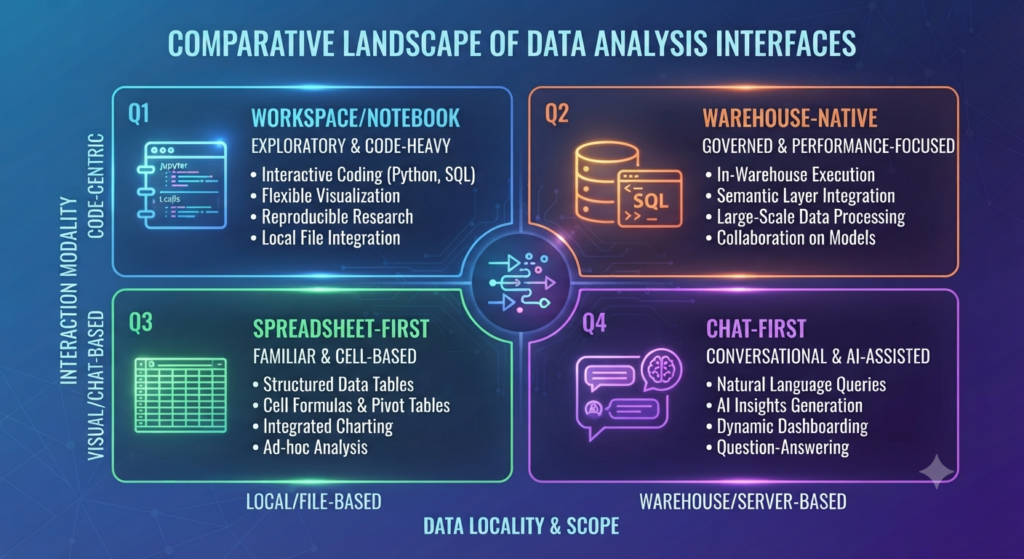
Chat-first analyst tools — ChatGPT’s Advanced Data Analysis and Claude — work inside a conversation you already have open. Upload a file, ask a question, get an answer. Lowest setup friction, but files are typically ephemeral per conversation with no persistent dataset or shareable dashboard.
Spreadsheet-first, no-code tools — Julius AI, Polymer, Rows.com — are purpose-built for data analysis specifically, with persistent datasets, better default visualizations, and zero-setup CSV upload. The tradeoff is a practical ceiling: most work best under 100,000 rows.
Notebook and workspace products — Hex, Deepnote — are built for data teams who write SQL and Python and need real-time collaboration, version control, and shareable data apps, not a quick answer to a one-off question.
Warehouse-native and BI-native layers — Power BI Copilot, ThoughtSpot, Gemini in BigQuery — sit on top of an existing data warehouse or BI platform, built for search-driven analytics and enterprise reporting at scale rather than ad-hoc file upload.
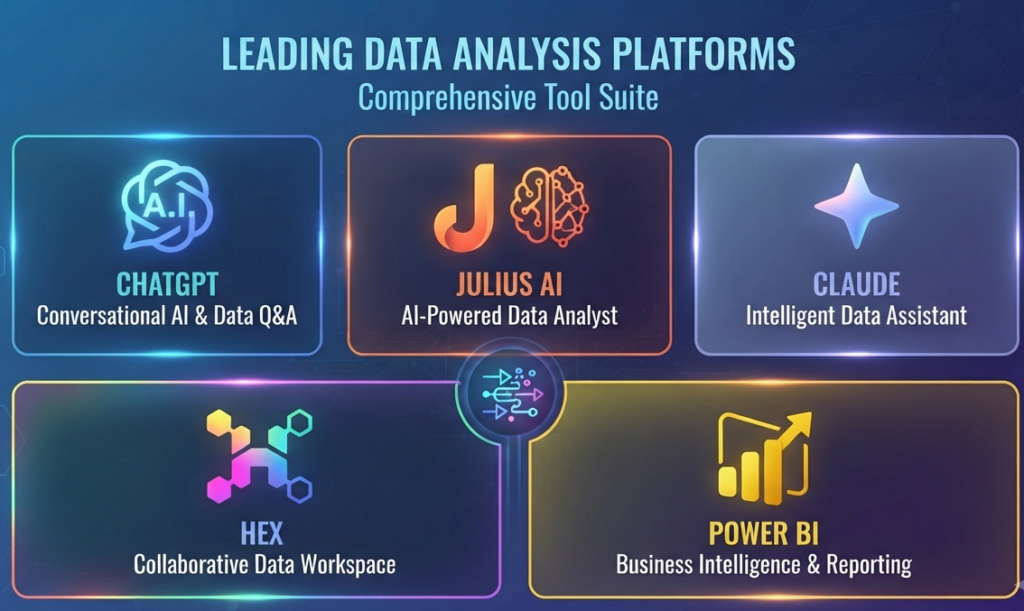
Best AI Data Analysis Tools Compared
| Tool | Lane | Best For | Starting Price |
|---|---|---|---|
| ChatGPT Advanced Data Analysis | Chat-first | Quick answers, users who already have ChatGPT | $8/month (Go plan) |
| Julius AI | Spreadsheet-first | Business users, marketers, non-coders | Free tier / $20/month Pro |
| Claude | Chat-first | Narrative interpretation, large context, sensitive documents | Free tier / $20/month Pro |
| Hex | Notebook/workspace | Data teams writing SQL and Python collaboratively | $149-199/user/month |
| Rows.com | Spreadsheet-first | Live-connected spreadsheet analysis | Free tier available |
| Polymer | Spreadsheet-first | No-code dashboards from raw spreadsheets | $500+/month (scale) |
| Power BI Copilot | Warehouse/BI-native | Microsoft-centric teams already on Power BI | $18-30/user/month |
The Hallucination Risk: Code Execution vs. Model Reasoning
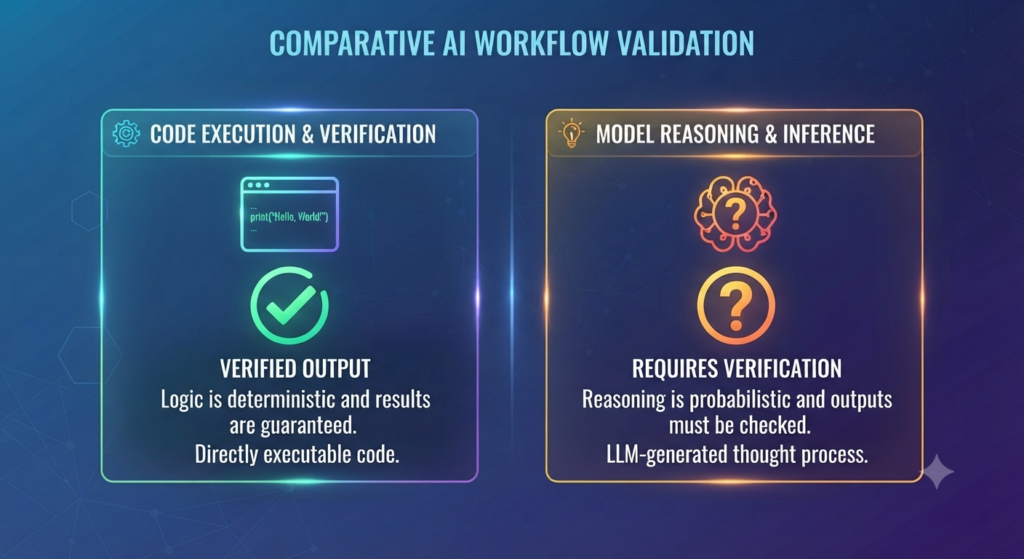
This is the single most important thing to understand before trusting a number from any of these tools. ChatGPT’s Advanced Data Analysis actually runs Python code against your data and shows you that code — a real, reviewable computation. Julius AI and Claude rely more heavily on model reasoning to arrive at an answer, which introduces genuine hallucination risk for numerical results: a plausible-sounding but incorrect statistic, a misidentified correlation, or an inappropriate statistical test applied without your knowledge. The practical rule: for any number that matters, prefer a tool that executes actual code, and cross-check critical figures against a known source regardless of which tool produced them.
Best for Specific Use Cases
Best all-around for most people: ChatGPT Advanced Data Analysis remains the broadest option — real code execution, strong charting, and low setup friction across a wide range of file types and questions.
Best if your job is mostly data analysis specifically: Julius AI is purpose-built rather than general-purpose, with persistent datasets and visualization defaults tuned for repeated analytical work rather than one-off questions.
Best for narrative interpretation of sensitive or lengthy documents: Claude’s large context window lets it read extensive files directly, and its writing quality suits reports meant for a human reader — see our Claude model comparison for which tier fits this kind of work.
Best for a real data team: Hex justifies its $149-199/user/month price for teams of five or more analysts who need SQL, Python, version control, and shareable data apps in one collaborative workspace.
Best for Microsoft-centric organizations: Power BI Copilot covers roughly 80% of routine analysis without leaving Excel, and most teams already have the license.
The Budget-Conscious Stack
A genuinely useful combination for solo users and small teams: ChatGPT Plus (or the cheaper Go plan) to run the actual computation, paired with Claude’s free tier to interpret and narrate the results in plain language — covering most ad-hoc analysis needs without paying for a specialized platform.
How to Choose
- Is this a one-off question or recurring work? One-off favors a chat-first tool; recurring analysis favors a spreadsheet-first or notebook tool with persistent datasets.
- Does the number need to be exactly right? Prefer tools that execute real code (ChatGPT, Hex) over tools that reason toward an answer (Julius, Claude alone) for anything with real stakes.
- How big is the dataset? Under 100K rows, spreadsheet-first tools work well. Beyond roughly a million rows, none of these replace a proper data warehouse with SQL access.
- Do you write SQL and Python, or need to avoid it entirely? Code-comfortable teams get more power from Hex or Deepnote; no-code teams get there faster with Julius or Polymer.
- Are you already paying for an ecosystem? Power BI Copilot or Gemini in BigQuery often deliver more value by activating a tool you already license than by adding a new platform.
FAQ
Can AI data analysis tools replace a data analyst? For simple, one-off questions, they meaningfully reduce the workload. For data modeling, pipeline design, stakeholder requirements gathering, or cross-system reconciliation, human judgment is still required — these tools accelerate existing analytical skills rather than replace the role.
Which AI data analysis tool is most accurate? Tools that execute actual code against your data — ChatGPT Advanced Data Analysis and Hex, specifically — carry less hallucination risk for numerical results than tools relying primarily on model reasoning, like Julius AI or Claude used alone. Always cross-check figures that matter.
What’s the cheapest way to get started with AI data analysis? ChatGPT Plus or the Go plan ($8-20/month) paired with Claude’s free tier covers most ad-hoc analysis needs for individuals and small teams without paying for a specialized platform.
Can these tools handle very large datasets? Most file-upload tools struggle past 50-100MB, and spreadsheet-first tools like Julius and Polymer work best under 100,000 rows. For datasets over roughly a million rows, a proper data warehouse with SQL access is still necessary.
Conclusion
The best AI data analysis tools in 2026 aren’t ranked on a single leaderboard — they split by lane: chat-first for quick, ad-hoc questions, spreadsheet-first for repeated non-technical analysis, notebook tools for collaborative data teams, and warehouse-native layers for enterprise scale. The accuracy question matters as much as the feature list: knowing whether a tool executes real code or reasons toward an answer should shape how much you trust any single number it gives you.
Related Vynula Guides
Official Source Package
- OpenAI (ChatGPT) — https://openai.com/chatgpt/
- Julius AI — https://julius.ai/
- Hex — https://hex.tech/


