



Out of the box, Claude Code can’t touch your GitHub repo, your Postgres database, or any internal API you haven’t pasted directly into the chat. MCP with Claude Code closes that gap — you point Claude Code at a running server, local or remote, and it starts reading and acting on those systems directly. This guide walks through the real setup: scopes, transports, the exact commands, and the debugging steps you’ll actually need.
1. What Actually Happens When You Connect a Server
When you ask Claude Code to check your open GitHub pull requests, Claude Code first recognizes it needs an external tool to fulfill the request, then sends a JSON-RPC request to the connected GitHub MCP server, which does the actual work of querying GitHub and returning structured results. Every MCP server exposes one or more tools, each with a name, a description, and a JSON schema for its arguments — Claude Code discovers these at startup and adds them to the tool list it can call during a session.
2. The Three Configuration Scopes

MCP with Claude Code supports three separate scopes, and knowing which one you’re in solves most “why isn’t my server showing up” problems before they happen:
- Local scope — configured for a single project on your machine only, not shared with anyone else.
- Project scope — checked into the repository itself, so every teammate working on that project gets the same servers automatically.
- User (global) scope — applies across every project you open with Claude Code, regardless of which repository you’re in.
If a server you added isn’t appearing, running claude mcp list from the project directory tells you what’s actually loaded in that context, and claude mcp get <name> tells you exactly which scope file a specific server lives in.
3. Stdio vs. HTTP: Choosing the Right Transport
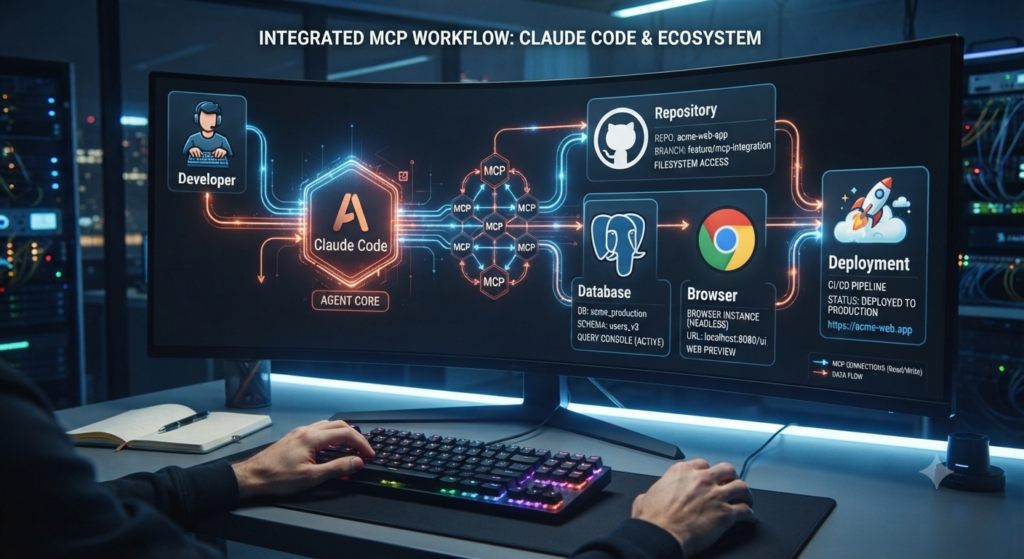
Two transports matter for MCP with Claude Code setup. Stdio launches the server as a local subprocess and pipes JSON-RPC messages over standard input/output — it’s fast, but the server has to live on your own machine, and it runs with your full user privileges, meaning anything that process can read, the model can read too. HTTP connects to a server running remotely, authenticated through OAuth, a bearer token, or similar — more setup, but a tighter security blast radius since the server lives behind its own auth layer rather than inheriting your local permissions.
A third transport, SSE (Server-Sent Events), was the original streaming option but is now considered deprecated in favor of streamable HTTP — if you see SSE in an older guide or an existing config, it still works, but plan to migrate.
The practical decision tree: local tool → stdio. Remote service → HTTP. Anything still labeled SSE → use it for now, but expect to migrate soon.
4. Setting Up MCP with Claude Code: Step by Step
- Install Claude Code (requires Node.js 20+):
npm install -g @anthropic-ai/claude-code - Add a local (stdio) server, using
--to separate the server name from the command Claude Code should spawn:claude mcp add filesystem -- npx -y @modelcontextprotocol/server-filesystem /path/to/project - Add a remote (HTTP) server by specifying the transport and URL directly, then completing whatever auth flow it requires (OAuth or a token).
- Verify the connection: run
claude mcp listto confirm the server appears, then ask Claude Code to perform a simple task using that server’s tools (e.g., “list my open pull requests”) to confirm it actually works end to end. - Debug if it doesn’t show up: run the exact install command manually in your terminal — the raw error it prints is almost always more useful than anything in Claude Code’s own status line.
5. The Starter Pack: Which Servers to Install First
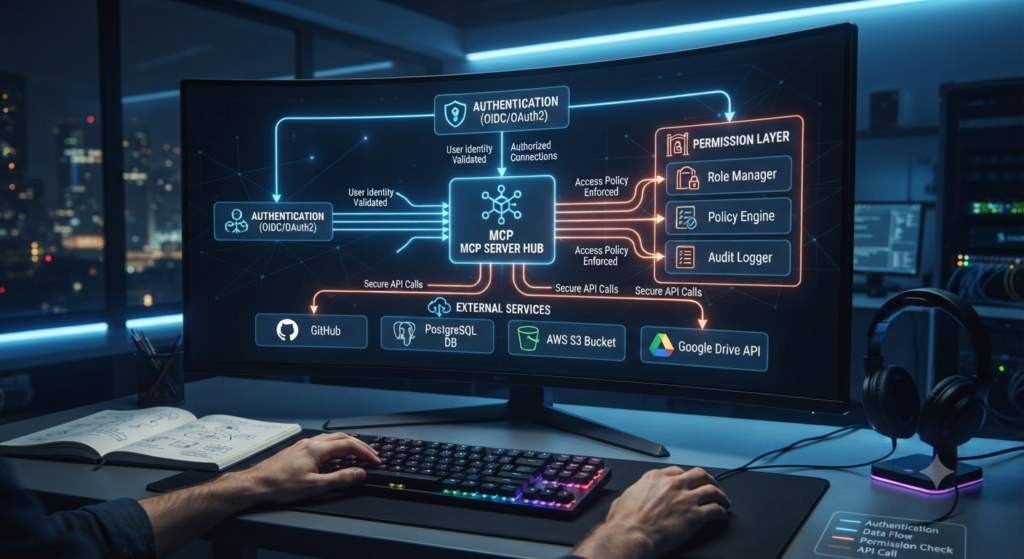
As of mid-2026 the public MCP server registry has grown past 2,300 entries — most are abandoned demos rather than maintained tools. The honest recommendation from practitioners actively using MCP with Claude Code day to day: install 3–5 servers maximum to start. Every connected server adds its tool definitions to Claude’s context window, and a bloated tool list measurably degrades tool-selection quality rather than just adding unused clutter.
For most developers, GitHub + Filesystem + Context7 covers roughly 80% of real coding workflows without burning context on tools you’ll rarely call — see our Best MCP Servers guide for the fuller comparison of what each server actually does.
Recommended starter pack by user type:
| User Type | Recommended Servers |
|---|---|
| Beginner developer | Filesystem |
| Professional developer | Filesystem + GitHub |
| Full-stack developer | Filesystem + GitHub + Postgres + Browser |
| DevOps engineer | Docker + GitHub + Filesystem |
| AI researcher | Browser + Filesystem + Context7 |
| Enterprise team | GitHub + Slack + Notion + database + internal APIs (via managed-mcp.json) |
6. Claude Code’s Dual Role: Client and Server
Here’s a detail most guides skip: Claude Code can act as both an MCP client (consuming servers like GitHub or Postgres that you’ve configured) and an MCP server itself (exposing its own tools — Bash, Read, Write, Edit, and more — to other MCP clients), simultaneously, in the same session. Running claude mcp serve exposes Claude Code as a server while it continues consuming its own configured servers in parallel. One important limit: there’s no MCP passthrough — if Claude Code is connected to a GitHub MCP server, a separate client connecting to Claude Code as a server can’t reach those GitHub tools indirectly. Each layer stays isolated.
7. Common Configuration Mistakes
A few mistakes show up repeatedly among developers new to MCP with Claude Code:
- Granting too many permissions. Share only the folder or repository the current project actually needs — not your entire filesystem or every repo you own.
- Installing too many servers at once. Start with the starter pack above and add more only as a specific workflow demands it, rather than connecting everything available on day one.
- Ignoring authentication hygiene. API keys, OAuth tokens, and credentials should live in a secrets manager or environment variables — never committed to a repo or pasted into documentation.
- Skipping updates. Both Claude Code and individual MCP servers move quickly; an outdated server accumulates compatibility and security gaps that a current one doesn’t have.
8. Debugging When a Server Doesn’t Show Up
Failures with MCP and Claude Code tend to cluster into a small number of buckets: the server is registered in the wrong scope (check with claude mcp list), the transport type doesn’t match what the server actually expects, an authentication step (OAuth, token) hasn’t completed, or the install command itself is failing silently. Running the install command by hand in your terminal, rather than through Claude Code, surfaces the real underlying error almost every time.
Anthropic’s own guidance is blunt on trust: MCP servers can execute arbitrary code and access local resources, so only install servers you actually trust — this matters more with stdio servers specifically, since they inherit your full local user privileges.
FAQ
Do I need to be a developer to use MCP with Claude Code? Basic usage — adding a well-documented server and asking Claude Code to use it — is fairly approachable. Building a custom server, or troubleshooting authentication for an enterprise integration, generally does require software development knowledge.
What’s the difference between stdio and HTTP servers? Stdio servers run locally as a subprocess with your full user privileges — fast, no network auth needed, but a wider blast radius if the server is compromised. HTTP servers run remotely behind their own authentication (OAuth or tokens), which takes more setup but keeps a tighter security boundary.
How many MCP servers should I connect to Claude Code? Practitioners generally recommend 3–5 to start. Every additional server adds its tool definitions to Claude’s context window, and too many connected servers measurably hurts tool-selection quality rather than just adding unused options.
Can Claude Code use its own connected MCP servers when acting as a server itself? No — there’s no MCP passthrough. If Claude Code is connected to, say, a GitHub MCP server as a client, a separate client connecting to Claude Code as a server can’t access those GitHub tools through it. Each layer of the architecture stays isolated.
Conclusion
Setting up MCP with Claude Code comes down to a small number of real decisions: which scope to configure it in, stdio versus HTTP for the transport, and a disciplined starter pack rather than connecting every server you can find. Get those three right, and Claude Code goes from a chat window to something that can actually read your repos, query your databases, and act on real systems — safely, and without drowning its own tool selection in unused options.
Related Vynula Guides
Official Source Package
- Model Context Protocol (official docs) — https://modelcontextprotocol.io/
- Anthropic (Claude Code documentation) — https://code.claude.com/