




Businesses are automating more work than ever before. From moving data between applications to managing customer requests and generating reports, repetitive processes can consume countless hours every week.
AI workflow tools help eliminate manual work by combining automation with artificial intelligence. Instead of simply connecting applications, modern AI platforms can understand context, make decisions, summarize information, generate content, and trigger complex workflows with minimal human intervention.
Whether you’re running a small business, managing marketing campaigns, building software, or operating an enterprise, AI workflow automation can significantly improve efficiency and reduce operational costs.
In this guide, we compare the best AI workflow tools in 2026, reviewing their AI capabilities, automation features, integrations, pricing, and ideal use cases.
What Are AI Workflow Tools?
AI workflow tools are software platforms that automate repetitive business processes using artificial intelligence.
Unlike traditional automation platforms that rely solely on predefined rules, AI-powered workflow tools can analyze information, interpret natural language, make decisions, and adapt workflows based on changing conditions.
Typical workflow automations include:
- Moving data between applications
- AI-generated email responses
- Lead qualification
- Customer support automation
- Document processing
- Meeting summaries
- CRM updates
- Social media publishing
- Report generation
Modern AI workflow platforms combine automation with large language models to create more intelligent and flexible business processes.
How AI Workflow Automation Works
Although every platform uses a different interface, most AI workflow tools follow a similar process.
Trigger Event

↓

Collect Data

↓

AI Analysis

↓

Decision Making

↓

Automated Actions

↓

Notifications

↓

Continuous Monitoring
For example, a workflow could automatically:
- Receive a customer email
- Analyze the message using AI
- Classify the request
- Generate a response draft
- Update the CRM
- Notify the support team
- Archive the conversation
—all without manual intervention.
Benefits of AI Workflow Tools
1. Reduce Repetitive Work
Automation removes many routine administrative tasks, allowing employees to focus on strategic work instead of manual processes.
Examples include:
- Data entry
- File organization
- Email routing
- CRM updates
- Report generation
2. Increase Productivity
AI workflow tools help businesses complete tasks faster by reducing delays between different systems and departments.
Instead of switching between multiple applications, workflows automate the movement of information automatically.
3. Improve Accuracy
Manual work often introduces errors.
AI automation helps reduce mistakes by consistently following predefined logic while using AI to interpret more complex information when necessary.
4. Scale Business Operations
As organizations grow, manual processes become increasingly difficult to manage.
AI workflow platforms make it possible to automate hundreds or even thousands of repetitive operations without significantly increasing administrative workload.
5. Connect Multiple Applications
One of the biggest advantages of workflow automation is integration.
Most platforms connect with services such as:
- Google Workspace
- Microsoft 365
- Slack
- Notion
- Salesforce
- HubSpot
- Gmail
- Dropbox
- GitHub
- Stripe
- Shopify
- Trello
This creates a unified workflow across different business systems.
How We Selected the Best AI Workflow Tools
Every platform included in this comparison was evaluated using the same research criteria.
AI Capabilities
We reviewed:
- AI assistants
- Intelligent automation
- Natural language workflow creation
- AI agents
- AI decision making
- Content generation
Automation Features
We compared:
- Workflow builders
- Trigger options
- Multi-step automations
- Scheduling
- Conditional logic
- Error handling
Integrations
Platforms were evaluated based on:
- Number of supported applications
- API capabilities
- Third-party integrations
- Cloud service compatibility
Ease of Use
We considered:
- User interface
- Learning curve
- Documentation
- Templates
- Community resources
Pricing
Each tool was compared based on:
- Free plan
- Premium pricing
- Team plans
- Enterprise options
- Overall value
Official Product Verification
Every workflow automation platform featured in this guide has been verified using:
- Official website
- Official documentation
- Product feature pages
- Pricing pages
- Release notes
- Help center resources
This ensures all information reflects the latest publicly available product details.
Top 10 AI Workflow Automation Platforms

1. Zapier
Best For: No-code business automation
Zapier remains one of the most popular workflow automation platforms, connecting thousands of applications without requiring coding knowledge. With Zapier AI, users can build workflows using natural language, generate AI-powered automations, and integrate leading AI models into business processes.
Its extensive app ecosystem makes it suitable for businesses of all sizes.
Key AI Features
- AI Workflow Builder
- Natural language automation
- AI-powered chatbot creation
- AI Agents
- AI-generated workflow suggestions
- Multi-step automation
Pros
- Huge integration library
- Beginner-friendly
- Powerful automation templates
- Excellent documentation
Cons
- Advanced workflows can become expensive
- Complex automations may require premium plans
Pricing
- Free Plan
- Professional
- Team
- Enterprise
2. Make
Best For: Visual workflow automation
Make provides a visual drag-and-drop automation builder that enables users to create highly customized workflows. Its flexible interface allows businesses to automate complex scenarios across multiple applications with advanced logic and branching.
Key AI Features
- AI module integration
- Visual workflow builder
- Conditional automation
- API connectivity
- AI content generation
- Advanced routing
Pros
- Highly customizable
- Excellent visual interface
- Strong API support
- Advanced automation capabilities
Cons
- Learning curve for beginners
- Complex scenarios require planning
Pricing
- Free Plan
- Core
- Pro
- Teams
- Enterprise
3. n8n
Best For: Open-source workflow automation
n8n is an open-source automation platform designed for developers and technical teams. It offers complete workflow customization, self-hosting options, and extensive API support while allowing AI-powered automation through integrations with leading language models.
Key AI Features
- AI agent workflows
- LLM integrations
- Self-hosted automation
- Code execution
- API orchestration
- Custom AI pipelines
Pros
- Open source
- Self-hosting available
- Developer-friendly
- Powerful customization
Cons
- Higher technical complexity
- Requires setup and maintenance
Pricing
- Community Edition
- Cloud Plans
- Enterprise
4. Microsoft Power Automate
Best For: Microsoft ecosystem automation
Microsoft Power Automate integrates deeply with Microsoft 365, Dynamics 365, Teams, SharePoint, and Copilot, making it an excellent choice for organizations already using Microsoft products.
Key AI Features
- Microsoft Copilot integration
- AI Builder
- Document processing
- Intelligent approvals
- Process mining
- Robotic Process Automation (RPA)
Pros
- Excellent Microsoft integration
- Enterprise-grade security
- Powerful AI Builder
- Strong governance tools
Cons
- Best suited for Microsoft users
- Advanced licensing can be complex
Pricing
- Premium Plans
- Per User
- Per Flow
- Enterprise
5. Workato
Best For: Enterprise automation
Workato combines workflow automation with AI orchestration for large organizations. It supports complex business processes across departments including finance, HR, marketing, and IT.
Key AI Features
- AI orchestration
- Enterprise workflow automation
- Intelligent integrations
- AI copilots
- Business process automation
- API management
Pros
- Enterprise-ready
- Powerful automation engine
- Excellent governance
- Large integration catalog
Cons
- Premium pricing
- Designed primarily for enterprises
Pricing
- Custom Enterprise Pricing
6. Relay.app
Best For: Human-in-the-loop automation
Relay.app focuses on combining AI automation with human approval steps, making it suitable for workflows that require both automation and manual decision-making.
Key AI Features
- AI workflow generation
- Human approval workflows
- AI task automation
- Smart routing
- Natural language automation
Pros
- Easy workflow design
- Excellent AI integration
- Human review support
- Modern interface
Cons
- Smaller integration library than Zapier
- Newer platform
Pricing
- Free Plan
- Paid Plans
7. Pipedream
Best For: Developers and API automation
Pipedream enables developers to automate workflows using APIs, serverless code, and AI services. It is ideal for technical teams building advanced integrations.
Key AI Features
- AI API integrations
- Serverless workflows
- Code-based automation
- Event-driven automation
- LLM integrations
Pros
- Developer-focused
- Powerful API support
- Flexible architecture
- Large component library
Cons
- Requires programming knowledge
- Less beginner-friendly
Pricing
- Free Plan
- Advanced Plans
8. Lindy
Best For: AI employees and business assistants
Lindy enables users to build AI assistants capable of handling scheduling, customer support, CRM updates, email management, and business operations through autonomous workflows.
Key AI Features
- AI employees
- Email automation
- Scheduling assistant
- CRM automation
- AI voice capabilities
- Multi-step reasoning
Pros
- Strong AI capabilities
- Modern interface
- Easy workflow creation
- Fast deployment
Cons
- Newer platform
- Smaller integration ecosystem
Pricing
- Free Plan
- Pro
- Business
9. Gumloop
Best For: AI-first workflow automation
Gumloop is designed specifically around AI workflows, allowing users to automate research, content generation, document processing, and business tasks using visual AI pipelines.
Key AI Features
- AI workflow builder
- Document automation
- Web scraping
- AI agents
- Content generation
- Data extraction
Pros
- AI-first platform
- Excellent automation speed
- Modern interface
- Powerful document workflows
Cons
- Newer ecosystem
- Fewer enterprise integrations
Pricing
- Free Plan
- Paid Plans
10. Bardeen
Best For: Browser automation and productivity
Bardeen automates repetitive browser-based tasks such as copying data, updating spreadsheets, sending emails, and managing CRM information directly from the browser.
Key AI Features
- Browser automation
- AI task generation
- Data extraction
- Smart workflows
- Productivity automation
- AI playbooks
Pros
- Easy browser automation
- No-code interface
- Strong productivity focus
- Quick setup
Cons
- Browser-centric workflows
- Limited enterprise functionality
Pricing
- Free Plan
- Professional
- Business
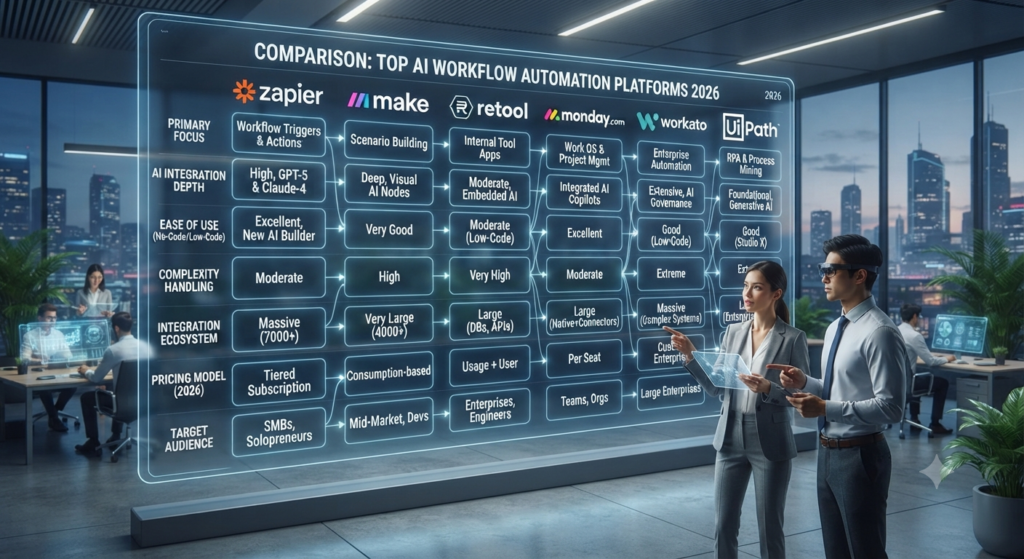
Comparison Table
| Tool | Best For | Free Plan | AI Features | No-Code | Enterprise |
|---|---|---|---|---|---|
| Zapier | General Automation | ✅ | ⭐⭐⭐⭐⭐ | ✅ | ✅ |
| Make | Visual Automation | ✅ | ⭐⭐⭐⭐☆ | ✅ | ✅ |
| n8n | Developers | ✅ | ⭐⭐⭐⭐⭐ | ⚠️ | ✅ |
| Power Automate | Microsoft Users | ❌ | ⭐⭐⭐⭐⭐ | ✅ | ✅ |
| Workato | Enterprises | ❌ | ⭐⭐⭐⭐⭐ | ✅ | ✅ |
| Relay.app | Human Approval Workflows | ✅ | ⭐⭐⭐⭐☆ | ✅ | ⚠️ |
| Pipedream | API Automation | ✅ | ⭐⭐⭐⭐☆ | ⚠️ | ✅ |
| Lindy | AI Employees | ✅ | ⭐⭐⭐⭐⭐ | ✅ | ⚠️ |
| Gumloop | AI Automation | ✅ | ⭐⭐⭐⭐☆ | ✅ | ⚠️ |
| Bardeen | Browser Automation | ✅ | ⭐⭐⭐⭐☆ | ✅ | ⚠️ |
How to Choose the Best AI Workflow Tool
Choosing the right AI workflow platform depends on your goals, technical experience, business size, and automation needs.
A tool that works perfectly for a small business may not be the best choice for an enterprise organization.
Before selecting an AI workflow tool, consider these factors.
1. Define Your Automation Goals
Start by identifying what processes you want to automate.
Common examples:
- Email management
- Customer support
- Marketing campaigns
- Data entry
- Sales workflows
- Document processing
- Reporting
- Internal communication
The best workflow platform should solve a specific business problem rather than simply add more software complexity.
2. Consider Technical Requirements
Different platforms target different users.
Beginners and Business Users
Recommended:
- Zapier
- Make
- Relay.app
- Bardeen
These platforms provide:
- No-code builders
- Templates
- Simple integrations
- Visual workflows
Developers and Technical Teams
Recommended:
- n8n
- Pipedream
Advantages:
- API flexibility
- Custom code
- Advanced automation logic
- Self-hosting options
Enterprise Organizations
Recommended:
- Workato
- Microsoft Power Automate
Advantages:
- Security controls
- Governance
- Compliance features
- Large-scale automation
3. Evaluate AI Capabilities
Not every automation platform has the same level of artificial intelligence.
Look for features such as:
- Natural language workflow creation
- AI agents
- AI decision making
- Document understanding
- Data analysis
- Content generation
- Intelligent routing
Modern AI workflow tools should do more than move information between applications.
4. Check Integration Support
A workflow platform is only useful if it connects with your existing tools.
Important integrations include:
- Gmail
- Google Workspace
- Microsoft 365
- Slack
- Notion
- Salesforce
- HubSpot
- Shopify
- Stripe
- GitHub
- CRM systems
Before choosing a platform, verify that your essential applications are supported.
5. Compare Pricing and Scalability
Consider:
- Number of automation runs
- AI feature limits
- Team members
- Enterprise requirements
- API usage costs
A free plan may work for individuals, but growing companies usually require paid plans.
Best AI Workflow Tools by Use Case
| Use Case | Best Tool |
|---|---|
| Best Overall AI Workflow Tool | Zapier |
| Best Visual Automation | Make |
| Best Open Source Option | n8n |
| Best Microsoft Workflow Solution | Power Automate |
| Best Enterprise Automation | Workato |
| Best AI Employee Workflows | Lindy |
| Best Developer Automation | Pipedream |
| Best AI-Native Workflows | Gumloop |
| Best Browser Automation | Bardeen |
| Best Human Approval Workflows | Relay.app |
AI Workflow Tools vs Traditional Automation
Traditional automation follows predefined rules:
Example:
“When a customer submits a form → send an email.”
AI workflow automation adds intelligence:
Example:
“When a customer sends an email → understand the request → classify urgency → create a response → update CRM → notify the correct team member.”
This difference allows businesses to automate more complex processes.
The Future of AI Workflow Automation
AI workflows are moving toward autonomous business operations.
Future AI workflow systems will increasingly include:
- Autonomous AI agents
- Self-improving workflows
- Multi-agent collaboration
- AI employees
- Predictive automation
- Real-time decision making
Companies that adopt AI workflow automation early will have significant advantages in efficiency and scalability.
Final Verdict
AI workflow tools have become essential for businesses looking to reduce repetitive work and improve operational efficiency.
For most users, Zapier remains one of the strongest overall choices because of its massive integration ecosystem and ease of use.
Users who want advanced visual automation may prefer Make, while developers looking for flexibility should consider n8n or Pipedream.
Enterprise organizations will benefit from platforms like Workato and Microsoft Power Automate, while companies exploring AI employees and autonomous workflows should evaluate Lindy and similar AI-first platforms.
The best AI workflow tool is ultimately the platform that matches your workflow complexity, technical requirements, and business objectives.
Frequently Asked Questions (FAQ)
What are AI workflow tools?
AI workflow tools are automation platforms that use artificial intelligence to create, manage, and optimize business processes with minimal manual work.
What is the best AI workflow tool in 2026?
Zapier, Make, n8n, Microsoft Power Automate, Workato, and Lindy are among the best AI workflow tools in 2026 depending on user requirements.
Are AI workflow tools free?
Many AI workflow platforms offer free plans with basic automation features. Advanced AI capabilities usually require paid subscriptions.
Can AI workflow tools replace manual tasks?
Yes. AI workflow platforms can automate repetitive tasks such as data entry, email management, reporting, document processing, and customer support workflows.
What is the difference between AI workflow tools and AI agents?
AI workflow tools automate structured processes, while AI agents can make decisions, reason through tasks, and perform actions more independently.
INTERNAL LINKS
- Best AI Productivity Tools in 2026
- Best AI Task Managers in 2026
- Best AI Project Management Tools in 2026
- Best AI Calendar Assistants in 2026
- Best AI Meeting Assistants in 2026
- Best AI Business Ideas in 2026
- What Is AI Workflow Automation? (2026)
OFFICIAL SOURCES
Zapier
https://zapier.com/
Microsoft Power Automate
https://powerautomate.microsoft.com/
Workato
https://www.workato.com/
Relay.app
https://relay.app/
Pipedream
https://pipedream.com/
Gumloop
https://www.gumloop.com/
Bardeen
https://www.bardeen.ai/


