




Quick Answer
AI workflow automation uses artificial intelligence to automate repetitive tasks, optimize business processes, and make intelligent decisions with minimal human intervention. Unlike traditional automation, AI-powered workflows can analyze data, adapt to changing conditions, and continuously improve their performance over time.
From customer support and marketing to software development and enterprise operations, AI workflow automation is helping organizations save time, reduce costs, and increase productivity across virtually every industry.
In this guide, you’ll learn what AI workflow automation is, how it works, where it’s used, the best tools available, and why it has become one of the most important trends in artificial intelligence in 2026.
Key Takeaways
- AI workflow automation combines artificial intelligence with process automation.
- Modern AI systems can make decisions instead of simply following predefined rules.
- Businesses use AI workflows to improve efficiency and reduce manual work.
- AI agents and workflow automation often work together to complete complex tasks.
- AI workflow automation is becoming essential for organizations of all sizes.
Table of Contents
- What Is AI Workflow Automation?
- How AI Workflow Automation Works
- Traditional Automation vs AI Workflow Automation
- Key Components of AI Workflows
- Benefits of AI Workflow Automation
- Real-World Business Use Cases
- Popular AI Workflow Automation Tools
- Common Challenges
- Frequently Asked Questions
- Final Verdict
What Is AI Workflow Automation?
AI workflow automation is the process of using artificial intelligence to automate business processes that normally require human decision-making.
Traditional automation follows fixed rules.
For example:
“If a customer submits a form, send an email.”
AI workflow automation goes much further.
Instead of simply executing predefined instructions, AI systems can:
- Analyze incoming information
- Understand natural language
- Prioritize tasks
- Generate content
- Make recommendations
- Choose the next action
- Learn from previous interactions
This enables organizations to automate increasingly complex workflows that previously required employees.
For example, instead of routing every customer support ticket to a human agent, an AI workflow can:
- Read the message
- Detect customer intent
- Search a knowledge base
- Draft a personalized response
- Escalate only complex cases
- Update the CRM automatically
- Notify the appropriate department
All within seconds.
Why AI Workflow Automation Matters
Businesses generate enormous amounts of data every day.
Processing this information manually is expensive, slow, and prone to errors.
AI workflow automation allows organizations to transform repetitive work into intelligent digital processes.
Rather than replacing employees entirely, these systems handle repetitive operational tasks, allowing teams to focus on creative problem-solving, strategic planning, and customer relationships.
As AI models continue to improve, workflow automation is becoming one of the biggest drivers of digital transformation across industries.
How AI Workflow Automation Works
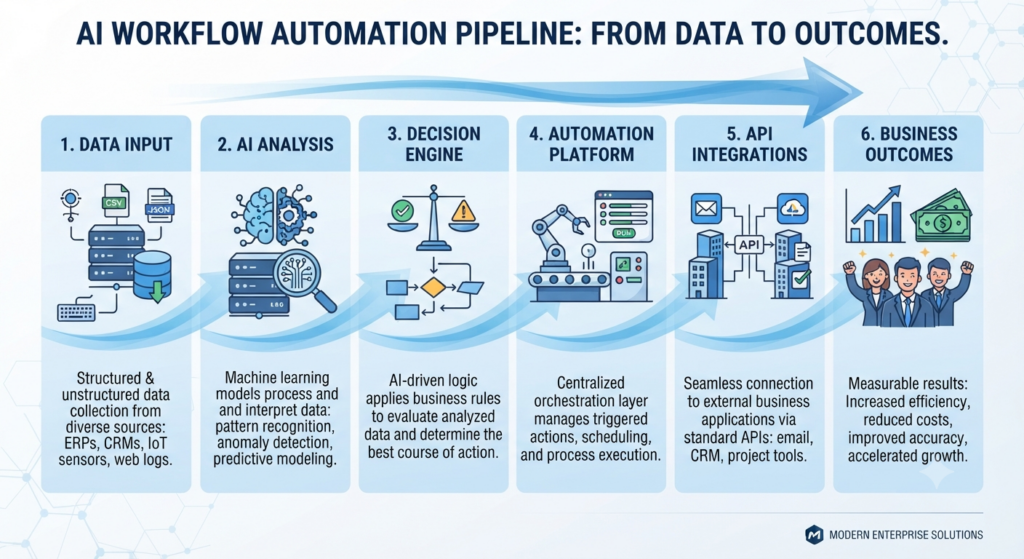
Although platforms vary, most AI workflows follow a similar structure.
Step 1: Data Collection
Everything begins with data.
Information may come from:
- Emails
- Documents
- CRM systems
- Customer chats
- APIs
- Databases
- Cloud applications
- Internal software
The AI gathers and organizes this information before taking action.
Step 2: AI Analysis
Once the data is collected, an AI model analyzes the information.
Depending on the workflow, the AI may:
- Classify requests
- Summarize documents
- Detect sentiment
- Identify priorities
- Extract key information
- Translate languages
- Generate recommendations
Unlike rule-based automation, AI can understand context rather than relying only on predefined conditions.
Step 3: Decision Making
One of the biggest advantages of AI workflow automation is intelligent decision-making.
Instead of following rigid instructions, AI can evaluate multiple possibilities before selecting the most appropriate action.
For example:
- Approving low-risk requests automatically
- Escalating unusual cases
- Assigning tasks based on urgency
- Recommending different workflows depending on customer needs
These capabilities allow businesses to automate increasingly sophisticated processes.
Step 4: Action Execution
After making a decision, the workflow performs one or more actions.
Examples include:
- Sending emails
- Updating databases
- Scheduling meetings
- Creating reports
- Generating invoices
- Assigning tickets
- Notifying employees
- Launching additional workflows
AI acts as the decision engine, while automation tools execute the required tasks.
Step 5: Continuous Improvement
Modern AI workflows often include monitoring and feedback mechanisms.
Organizations analyze workflow performance to identify bottlenecks, improve prompts, refine decision logic, and optimize overall efficiency over time.
Traditional Automation vs AI Workflow Automation
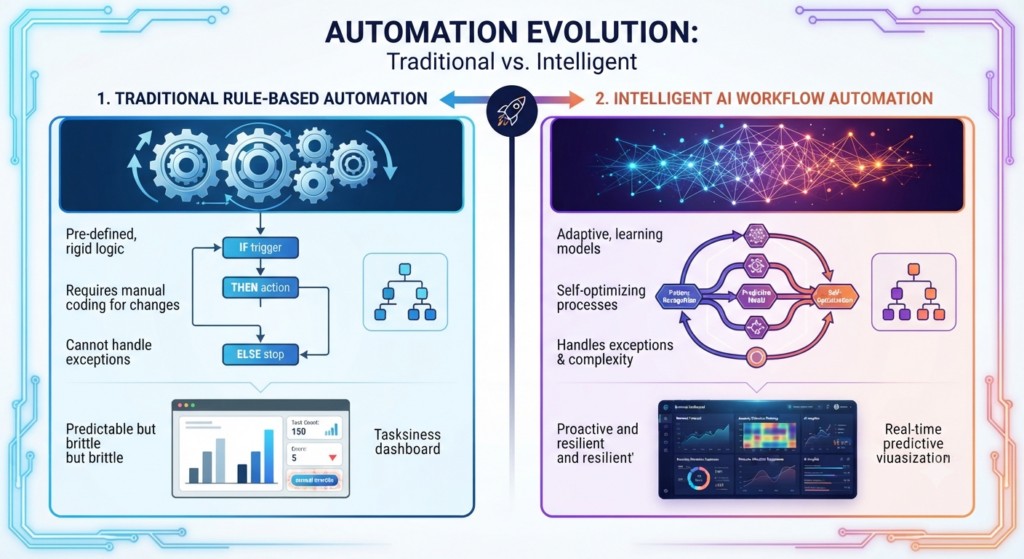
Many people confuse workflow automation with AI workflow automation, but they are fundamentally different.
| Traditional Automation | AI Workflow Automation |
|---|---|
| Rule-based | AI-driven decision making |
| Fixed workflows | Adaptive workflows |
| Requires manual updates | Can improve with new data |
| Limited flexibility | Handles changing situations |
| Simple repetitive tasks | Complex business processes |
Traditional automation follows instructions.
AI workflow automation understands context, evaluates information, and supports intelligent decision-making.
Key Components of AI Workflow Automation
An effective AI workflow usually combines several technologies working together.
Artificial Intelligence Models
Large language models and other AI systems analyze information, generate responses, summarize content, classify data, and support decision-making.
Automation Platform
Workflow automation platforms connect applications and coordinate each step of the process.
APIs
Application Programming Interfaces enable AI systems to communicate with external software, databases, and online services.
Business Rules
Although AI introduces flexibility, organizations still define governance policies, security requirements, and approval conditions.
Human Oversight
Many workflows include human approval for sensitive or high-risk decisions, creating a balance between automation and accountability.
Benefits of AI Workflow Automation
Organizations of every size are adopting AI workflow automation because it improves productivity while reducing repetitive manual work. Instead of spending valuable time on routine processes, employees can focus on higher-value activities such as strategy, creativity, and customer relationships.
Below are some of the biggest advantages.
Increased Productivity
One of the primary benefits of AI workflow automation is speed.
Tasks that previously required hours of manual effort can now be completed in minutes—or even seconds.
Examples include:
- Processing customer requests
- Generating reports
- Summarizing documents
- Classifying support tickets
- Creating marketing content
Employees spend less time performing repetitive tasks and more time solving complex problems.
Reduced Human Error
Manual processes inevitably introduce mistakes.
AI workflows help reduce errors by performing repetitive operations consistently and accurately.
For example, AI can automatically:
- Verify data entries
- Detect missing information
- Flag inconsistencies
- Validate documents
- Standardize business processes
Although human oversight remains important, automation significantly improves overall reliability.
Lower Operating Costs
Automation allows businesses to complete more work without proportionally increasing staffing costs.
Organizations often reduce expenses by automating:
- Customer support
- Invoice processing
- Data entry
- Scheduling
- Internal reporting
- Lead qualification
Over time, these efficiency gains can deliver substantial cost savings.
Better Customer Experience
Customers increasingly expect fast and personalized service.
AI workflow automation enables businesses to respond more quickly by:
- Routing requests intelligently
- Providing instant answers
- Personalizing communications
- Prioritizing urgent cases
- Following up automatically
This leads to shorter response times and improved customer satisfaction.
24/7 Availability
Unlike human teams, AI-powered workflows operate continuously.
Businesses can process requests, answer common questions, and execute routine tasks around the clock without interruption.
This is particularly valuable for global organizations serving customers across multiple time zones.
Scalability
As organizations grow, manual workflows often become difficult to manage.
AI automation scales far more efficiently.
Whether processing hundreds or millions of requests, cloud-based AI systems can expand with business demand while maintaining consistent performance.
Real-World AI Workflow Automation Examples
AI workflow automation is already transforming numerous industries.
Here are some of the most common applications.
Customer Support
AI automatically:
- Reads customer inquiries
- Identifies intent
- Suggests solutions
- Drafts responses
- Escalates complex cases
- Updates CRM systems
Support agents can then focus on more challenging conversations instead of repetitive requests.
Marketing
Marketing teams use AI workflows to:
- Generate blog ideas
- Write email campaigns
- Create social media posts
- Personalize customer messaging
- Analyze campaign performance
- Score leads automatically
This significantly accelerates content production and campaign optimization.
Human Resources
HR departments automate tasks such as:
- Resume screening
- Candidate matching
- Interview scheduling
- Employee onboarding
- Policy questions
- Internal knowledge management
AI reduces administrative work while improving the employee experience.
Sales
Sales organizations use AI workflow automation to:
- Qualify leads
- Prioritize prospects
- Generate personalized outreach
- Update CRM records
- Schedule meetings
- Forecast revenue
Sales representatives spend more time selling and less time performing administrative work.
Finance
Finance teams automate:
- Invoice processing
- Expense approvals
- Fraud detection
- Financial reporting
- Budget analysis
- Payment verification
Automation improves both efficiency and compliance.
Software Development
Developers increasingly integrate AI workflows into their daily operations.
Examples include:
- Code generation
- Documentation
- Bug triage
- Pull request summaries
- Automated testing
- Deployment assistance
Combined with AI coding assistants, workflow automation helps development teams ship software faster.
Industries Using AI Workflow Automation
Almost every industry now benefits from AI-driven automation.
Some of the fastest adopters include:
- Healthcare
- Banking
- Insurance
- Retail
- Manufacturing
- Education
- Logistics
- Government
- Legal services
- Software companies
As AI becomes more accessible, adoption continues to accelerate worldwide.
Popular AI Workflow Automation Platforms
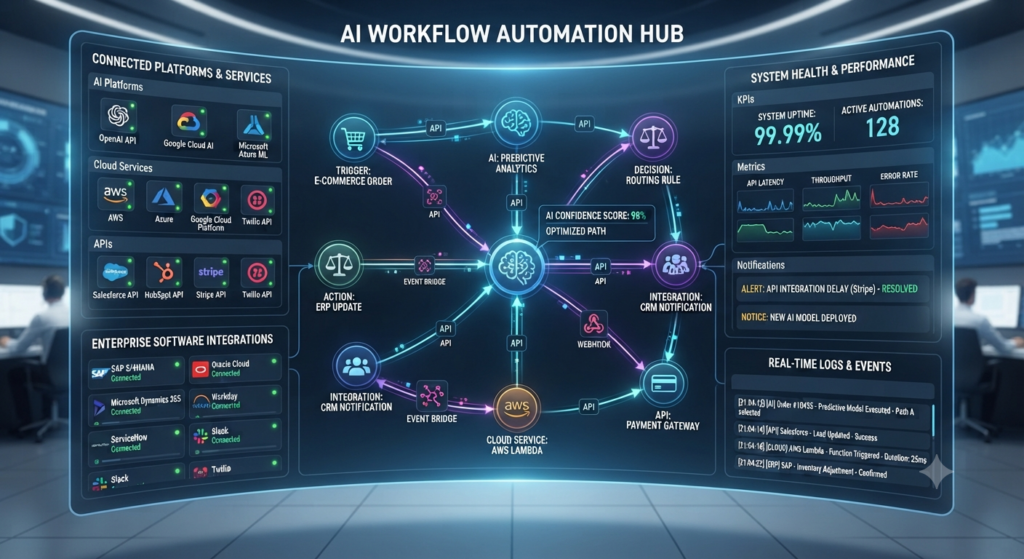
The AI automation ecosystem has expanded rapidly, with platforms serving everyone from individual creators to global enterprises.
Zapier
Zapier connects thousands of applications and now includes AI-powered automation features.
Best For
- Small businesses
- No-code users
- Marketing teams
Strengths
- Easy setup
- Massive app library
- AI-powered workflows
- Excellent integrations
n8n
n8n is an open-source workflow automation platform popular among developers and technical teams.
Best For
- Developers
- Self-hosted environments
- Advanced automation
Strengths
- Flexible customization
- Open source
- AI integrations
- Powerful workflow builder
Make
Formerly known as Integromat, Make offers highly visual workflow automation with extensive AI capabilities.
Best For
- Visual workflow design
- Business automation
- Multi-step processes
Strengths
- Intuitive interface
- Complex automation
- Large integration ecosystem
Microsoft Power Automate
Microsoft’s automation platform integrates deeply with Microsoft 365, Azure, Dynamics, and Copilot.
Best For
- Enterprise organizations
- Microsoft ecosystem
- Large businesses
Strengths
- Enterprise security
- Microsoft integration
- AI Builder
- Scalable automation
UiPath
UiPath combines robotic process automation (RPA) with artificial intelligence to automate enterprise operations.
Best For
- Large enterprises
- Banking
- Manufacturing
- Finance
Strengths
- Enterprise-grade automation
- AI document processing
- Advanced analytics
- Governance features
Gumloop
Gumloop is a newer AI-native workflow automation platform focused on connecting large language models with business processes.
Best For
- AI-first startups
- Marketing
- Research
- AI agents
Strengths
- Native AI workflows
- Visual builder
- LLM integrations
- Rapid deployment
AI Workflow Automation vs AI Agents
Although the terms are often used interchangeably, they describe different concepts.
AI Workflow Automation focuses on automating predefined business processes with AI-enhanced decision-making.
AI Agents, on the other hand, are autonomous systems capable of planning, reasoning, and executing multi-step tasks with minimal human guidance.
In practice, many organizations combine both approaches.
For example:
- An AI agent determines the best course of action.
- The workflow automation platform executes the required business processes.
- APIs connect multiple software systems.
- Humans review only exceptional cases.
Together, these technologies create intelligent, scalable digital operations.
Common Challenges
Despite its advantages, AI workflow automation also presents several challenges.
Data Quality
Poor data leads to poor decisions.
Organizations must ensure that AI systems receive accurate, complete, and up-to-date information.
Security
Automated workflows often access sensitive customer and business data.
Strong authentication, encryption, and permission controls are essential.
Compliance
Industries such as healthcare and finance must comply with strict regulations regarding data privacy and automated decision-making.
Human Oversight
AI should assist people—not completely replace human judgment in high-risk situations.
Critical decisions often require human approval.
Change Management
Introducing AI automation changes existing workflows.
Successful adoption requires employee training, clear communication, and continuous process improvement.
Best Practices for Successful AI Workflow Automation
Organizations implementing AI automation should follow several best practices:
- Start with repetitive, high-impact workflows.
- Clearly define business objectives.
- Monitor workflow performance regularly.
- Keep humans involved in sensitive decisions.
- Continuously improve prompts and automation logic.
- Prioritize security and compliance.
- Measure ROI using productivity and efficiency metrics.
- Expand automation gradually instead of attempting to automate everything at once.
Frequently Asked Questions (FAQ)
What is AI workflow automation?
AI workflow automation combines artificial intelligence with workflow automation to complete business processes that normally require human decision-making. Unlike traditional automation, AI can analyze information, understand context, and adapt to changing situations.
How is AI workflow automation different from traditional automation?
Traditional automation follows predefined rules, while AI workflow automation can interpret data, make intelligent decisions, generate content, and improve workflows over time using AI models.
Is AI workflow automation only for large companies?
No. Small businesses, freelancers, startups, and enterprises can all benefit from AI workflow automation. Many modern platforms offer no-code solutions that make automation accessible to organizations of any size.
What industries use AI workflow automation?
AI workflow automation is widely used in healthcare, finance, marketing, customer support, education, manufacturing, logistics, software development, human resources, and retail.
What are the most popular AI workflow automation tools?
Some of the leading platforms include Zapier, n8n, Make, Microsoft Power Automate, UiPath, and Gumloop. Each platform offers different strengths depending on technical expertise and business requirements.
Can AI workflow automation replace employees?
AI workflow automation is designed to automate repetitive tasks rather than replace entire jobs. In most organizations, it enhances employee productivity by allowing people to focus on creative, strategic, and customer-facing work.
What are AI agents in workflow automation?
AI agents are autonomous systems capable of reasoning, planning, and executing complex tasks. They often work together with workflow automation platforms to complete business processes more efficiently.
Is AI workflow automation secure?
It can be, provided organizations implement strong security practices such as encryption, access controls, authentication, audit logging, and compliance with data privacy regulations.
Do I need programming skills to build AI workflows?
Not necessarily. Many platforms provide drag-and-drop interfaces and no-code builders, while developers can use APIs and custom integrations for more advanced automation.
What is the future of AI workflow automation?
As AI models continue to improve, workflow automation will become more intelligent, autonomous, and personalized. Businesses are expected to increasingly adopt AI-driven workflows to improve efficiency, reduce costs, and accelerate innovation.
Final Verdict

AI workflow automation has evolved far beyond simple rule-based automation. By combining artificial intelligence with modern workflow platforms, organizations can automate repetitive processes while enabling systems to analyze data, make informed decisions, and adapt to changing business needs.
Whether you’re a freelancer looking to streamline daily tasks, a growing startup building scalable operations, or a large enterprise optimizing complex processes, AI workflow automation offers significant opportunities to improve productivity and reduce operational costs.
As AI agents, large language models, and automation platforms continue to mature, AI workflow automation is expected to become a core component of modern digital transformation strategies across nearly every industry.
Related Articles
If you enjoyed this guide, you may also find these articles helpful:
- What is MCP (Model Context Protocol) (2026): The Complete Guide
- What Is Model Context Protocol (MCP): AI Standard Connecting Modern AI Systems
- Best AI Coding Tools in 2026: The Ultimate Guide to the Future of AI Powered Development
- You’re Probably Missing These Free AI Tools in 2026 (And They’re Changing Everything)
- ChatGPT Models Explained (2026): Complete Guide to OpenAI’s AI Models
- Claude AI Models Explained (2026): Choosing Between Haiku, Sonnet, Opus & Claude Code
References
- Zapier Official Documentation — https://zapier.com
- n8n Documentation — https://n8n.io
- Make Documentation — https://www.make.com
- Microsoft Power Automate Documentation — https://powerautomate.microsoft.com
- UiPath Documentation — https://www.uipath.com
- Gumloop Official Website — https://www.gumloop.com


