




Discover the best AI calendar assistants in 2026. Compare Motion, Reclaim AI, Clockwise, Google Gemini, Microsoft Copilot, Notion Calendar, and more to automate scheduling, organize meetings, and boost productivity.
Managing a busy schedule has become increasingly challenging. Between meetings, deadlines, emails, personal commitments, and collaborative projects, keeping everything organized can quickly become overwhelming.
Traditional digital calendars help users record appointments, but modern AI calendar assistants go much further.
Powered by artificial intelligence, these tools can automatically schedule meetings, resolve calendar conflicts, prioritize tasks, protect focus time, suggest the best meeting slots, and optimize your daily agenda based on your work habits.
Instead of manually rearranging your calendar every day, AI calendar assistants continuously adapt your schedule to maximize productivity and reduce unnecessary interruptions.
Whether you’re a freelancer, business executive, remote worker, project manager, student, or entrepreneur, an AI-powered scheduling assistant can save hours every week while helping you stay organized.
In this guide, we’ll compare the best AI calendar assistants available in 2026, explore their features, pricing, strengths, and limitations, and help you choose the right solution for your workflow.
Why AI Calendar Assistants Matter in 2026

Modern work environments have become more dynamic than ever.
Professionals often manage dozens of meetings each week while balancing projects, emails, collaborative tasks, and personal responsibilities.
Manual scheduling creates several common problems:
- Double-booked meetings
- Constant calendar changes
- Lost focus time
- Scheduling conflicts
- Forgotten deadlines
- Meeting overload
- Poor work-life balance
AI calendar assistants solve these challenges by automatically organizing schedules based on priorities instead of simply displaying appointments.
Many platforms can even learn your working preferences over time and continuously improve scheduling recommendations.
Benefits of AI Calendar Assistants
AI scheduling tools provide much more than calendar management.
Key benefits include:
- Automatic meeting scheduling
- Smart conflict detection
- Focus time protection
- Task prioritization
- Calendar optimization
- Team availability analysis
- Time blocking
- Meeting recommendations
- Productivity insights
- Work-life balance improvements
These features help professionals spend less time managing their calendars and more time completing meaningful work.
What Makes a Great AI Calendar Assistant?
Choosing the right scheduling assistant depends on several important factors.
Intelligent Scheduling
The best tools automatically identify available time slots without requiring manual coordination.
Calendar Integrations
Support for Google Calendar, Microsoft Outlook, Apple Calendar, and other productivity platforms is essential.
Task Management
Many leading assistants combine calendars with intelligent task planning.
Collaboration
Teams benefit from assistants that coordinate multiple calendars simultaneously.
Automation
Recurring scheduling tasks should happen automatically without constant user input.
Privacy & Security
Because calendars contain sensitive business information, strong security practices and transparent privacy policies are essential.
How We Evaluated These AI Calendar Assistants
For this guide, we compared each platform using the following criteria:
- AI scheduling quality
- Automation features
- Calendar integrations
- Ease of use
- Productivity improvements
- Collaboration capabilities
- Mobile experience
- Pricing
- Security
- Overall value
Rather than ranking tools solely by popularity, we focused on how effectively they help users save time and improve daily productivity.
Quick Comparison
| Tool | Best For | AI Scheduling | Task Planning | Calendar Sync | Free Version |
|---|---|---|---|---|---|
| Motion | Productivity optimization | ✅ | ✅ | ✅ | Trial |
| Reclaim AI | Smart scheduling | ✅ | ✅ | ✅ | ✅ |
| Clockwise | Team scheduling | ✅ | Limited | ✅ | ✅ |
| Google Gemini | Google Workspace | ✅ | Limited | ✅ | ✅ |
| Microsoft Copilot | Microsoft 365 | ✅ | Limited | ✅ | Limited |
| Notion Calendar | Notion users | ✅ | ✅ | ✅ | ✅ |
| Trevor AI | Time blocking | ✅ | ✅ | ✅ | Limited |
| Sunsama | Daily planning | Limited | ✅ | ✅ | Trial |
| Akiflow | Productivity workflows | ✅ | ✅ | ✅ | Trial |
| Calendly AI | Meeting scheduling | ✅ | Limited | ✅ | ✅ |
The Best AI Calendar Assistants in 2026
Artificial intelligence has transformed digital calendars into intelligent personal assistants capable of managing schedules, protecting focus time, coordinating meetings, and helping users work more efficiently.
The following platforms represent the best AI calendar assistants available in 2026 for individuals, teams, and businesses.
1. Motion

Motion has established itself as one of the most advanced AI-powered scheduling assistants available today.
Rather than functioning as a traditional calendar, Motion continuously reorganizes your schedule based on deadlines, priorities, meetings, and available working hours.
If a meeting is added or a task takes longer than expected, Motion automatically rebuilds your daily schedule without requiring manual adjustments.
This intelligent automation makes it particularly valuable for busy professionals managing multiple projects simultaneously.
Key Features
- AI-powered scheduling
- Automatic calendar optimization
- Intelligent task planning
- Focus time protection
- Deadline management
- Meeting prioritization
- Team scheduling
- Calendar synchronization
- Project planning
- Productivity analytics
Real-World Use Cases
Motion is commonly used for:
- Project management
- Startup teams
- Remote work
- Executive scheduling
- Consulting
- Agency workflows
- Personal productivity
- Time management
Advantages
Motion minimizes manual scheduling by automatically adapting calendars whenever priorities change.
Its ability to balance meetings with focused work sessions makes it one of the strongest productivity assistants currently available.
Limitations
Motion focuses on premium productivity workflows and does not offer a permanent free plan.
Pricing
- Free trial
- Individual plan
- Business plan
Best For
- Entrepreneurs
- Executives
- Consultants
- Startup founders
- Productivity enthusiasts
2. Reclaim AI
Reclaim AI has become one of the most intelligent scheduling assistants for professionals who need to balance meetings, tasks, habits, and personal time.
Unlike traditional calendars, Reclaim AI automatically finds the best available time for your work based on priorities and availability. As your schedule changes throughout the day, the platform continuously reorganizes your calendar to ensure important tasks are completed without constant manual adjustments.
Its deep integration with Google Calendar has made it a favorite among remote teams and busy professionals.
Key Features
- AI-powered scheduling
- Automatic task planning
- Habit scheduling
- Smart meeting coordination
- Focus time protection
- Calendar synchronization
- Team scheduling
- Productivity analytics
- Buffer time management
- Google Calendar integration
Real-World Use Cases
Reclaim AI is commonly used for:
- Remote work
- Project management
- Personal productivity
- Startup teams
- Executive scheduling
- Agency operations
- Hybrid workplaces
Advantages
Reclaim AI excels at protecting focus time while automatically balancing meetings, recurring habits, and project deadlines.
Limitations
The platform currently works best within the Google Workspace ecosystem.
Pricing
- Free plan available
- Starter
- Business
- Enterprise
Best For
- Remote professionals
- Startup teams
- Knowledge workers
- Consultants
- Google Workspace users
3. Clockwise
Clockwise is designed to help teams maximize productive work hours by intelligently organizing meetings across multiple calendars.
Instead of manually finding available meeting slots, Clockwise automatically rearranges schedules to create larger blocks of uninterrupted focus time.
Its AI continuously analyzes calendar availability and recommends scheduling changes that improve collaboration without sacrificing productivity.
Key Features
- AI meeting optimization
- Focus time creation
- Smart calendar management
- Team scheduling
- Calendar synchronization
- Slack integration
- Google Calendar integration
- Flexible meeting coordination
- Scheduling analytics
- Productivity insights
Real-World Use Cases
Clockwise is widely used for:
- Engineering teams
- Product teams
- Sales organizations
- Remote companies
- Software development
- Consulting firms
- Enterprise collaboration
Advantages
Clockwise significantly reduces fragmented workdays by intelligently grouping meetings together and protecting uninterrupted work periods.
Limitations
Many advanced collaboration features are available only through premium plans.
Pricing
- Free version
- Teams
- Business
- Enterprise
Best For
- Engineering teams
- Product managers
- Remote organizations
- Technology companies
4. Google Gemini
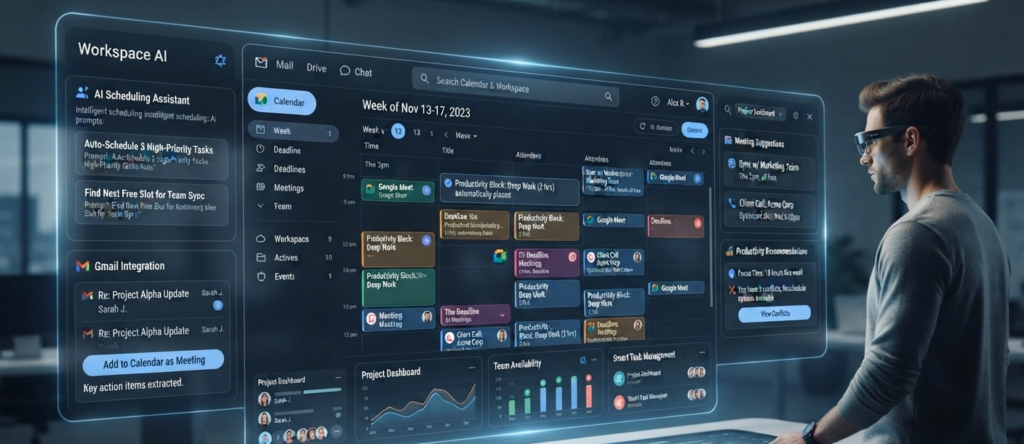
Google Gemini extends AI-powered scheduling through its integration with Google Workspace, making calendar management more intelligent and conversational.
Users can organize meetings, review schedules, summarize upcoming events, and coordinate appointments across Gmail, Google Calendar, and Google Meet using natural language.
As Google’s AI capabilities continue to evolve, Gemini is becoming an increasingly valuable productivity assistant for both individuals and businesses.
Key Features
- AI scheduling assistance
- Google Calendar integration
- Gmail integration
- Google Meet support
- Natural language planning
- Smart reminders
- AI summaries
- Workspace collaboration
- Productivity suggestions
- Multi-device support
Real-World Use Cases
Gemini is commonly used for:
- Business scheduling
- Team collaboration
- Educational planning
- Project coordination
- Personal organization
- Hybrid workplaces
Advantages
Gemini works seamlessly inside Google’s productivity ecosystem, allowing users to manage schedules without switching between multiple applications.
Limitations
Some AI scheduling capabilities depend on Google Workspace or Google AI subscription plans.
Pricing
- Free version available
- Google AI Pro
- Google AI Ultra
- Google Workspace plans
Best For
- Google Workspace users
- Students
- Businesses
- Teams
- Educators
5. Microsoft Copilot
Microsoft Copilot brings AI-powered scheduling directly into the Microsoft 365 ecosystem.
Working alongside Outlook, Teams, and Microsoft Calendar, Copilot helps users organize meetings, summarize schedules, prepare agendas, and recommend the most efficient times for collaboration.
Organizations already relying on Microsoft 365 can improve scheduling efficiency without introducing additional calendar software.
Key Features
- AI meeting scheduling
- Outlook integration
- Microsoft Teams support
- Calendar optimization
- Email assistance
- Meeting summaries
- Intelligent reminders
- Task recommendations
- Enterprise security
- Microsoft 365 integration
Real-World Use Cases
Microsoft Copilot is commonly used for:
- Enterprise organizations
- Corporate scheduling
- HR departments
- Sales teams
- Executive assistants
- Internal collaboration
- Business operations
Advantages
Copilot combines Microsoft’s productivity ecosystem with AI-driven scheduling, making it an excellent solution for organizations already using Microsoft 365.
Limitations
Many advanced Copilot capabilities require paid Microsoft subscriptions.
Pricing
- Microsoft 365 Personal
- Microsoft 365 Family
- Microsoft 365 Business
- Microsoft 365 Enterprise
- Copilot add-on
Best For
- Enterprise users
- Corporate teams
- Business professionals
- Microsoft ecosystem users
6. Notion Calendar
Notion Calendar combines intelligent scheduling with Notion’s powerful workspace ecosystem, creating a unified environment for planning projects, meetings, and daily tasks.
Users can connect their calendars with Notion databases, documents, and collaborative workspaces, allowing schedules and project information to stay synchronized.
This integration makes Notion Calendar especially valuable for teams managing both knowledge and time in a single platform.
Key Features
- AI-assisted scheduling
- Google Calendar synchronization
- Notion workspace integration
- Event management
- Project planning
- Team collaboration
- Time blocking
- Cross-device synchronization
- Productivity organization
- Meeting planning
Real-World Use Cases
Notion Calendar is commonly used for:
- Startup teams
- Content creators
- Marketing teams
- Product management
- Personal organization
- Agency workflows
- Collaborative planning
Advantages
Notion Calendar brings together scheduling, documentation, and project management, reducing the need to switch between multiple productivity applications.
Limitations
Its greatest value is achieved when used alongside the broader Notion ecosystem.
Pricing
- Free plan available
- Plus
- Business
- Enterprise
Best For
- Notion users
- Creative teams
- Startups
- Project managers
- Knowledge workers
7. Trevor AI
Trevor AI is designed for users who want to transform their task lists into realistic daily schedules.
Instead of simply displaying tasks, Trevor AI intelligently allocates time blocks within your calendar, helping you complete important work before deadlines while maintaining a balanced schedule.
Its integration with popular task management platforms makes it particularly useful for professionals juggling multiple projects.
Key Features
- AI-assisted time blocking
- Smart task scheduling
- Calendar synchronization
- Priority management
- Deadline tracking
- Productivity planning
- Google Calendar integration
- Task management integrations
- Daily planning
- Flexible scheduling
Real-World Use Cases
Trevor AI is commonly used for:
- Personal productivity
- Freelance work
- Project planning
- Student scheduling
- Daily task management
- Consulting
- Small business operations
Advantages
Trevor AI helps users build realistic schedules by automatically assigning dedicated time for important tasks instead of relying on static to-do lists.
Limitations
Advanced integrations and automation features are more limited than those offered by enterprise-focused competitors.
Pricing
- Free plan available
- Pro subscription
Best For
- Freelancers
- Students
- Professionals
- Entrepreneurs
- Productivity enthusiasts
8. Sunsama
Sunsama focuses on intentional daily planning rather than filling calendars with as many meetings as possible.
The platform encourages users to organize their workdays by balancing meetings, deep work, personal tasks, and realistic time estimates.
Its philosophy emphasizes sustainable productivity and reducing burnout.
Key Features
- Daily planning
- AI-assisted scheduling
- Time blocking
- Task organization
- Calendar integration
- Workload balancing
- Focus planning
- Weekly reviews
- Productivity analytics
- Team collaboration
Real-World Use Cases
Sunsama is commonly used for:
- Knowledge work
- Creative professionals
- Startup founders
- Remote workers
- Personal productivity
- Project planning
- Team coordination
Advantages
Sunsama promotes healthier work habits by helping users avoid overloaded schedules and maintain realistic daily plans.
Limitations
The platform prioritizes personal planning over large-scale enterprise scheduling.
Pricing
- Free trial
- Monthly subscription
- Annual subscription
Best For
- Remote professionals
- Creatives
- Entrepreneurs
- Managers
- Individual productivity
9. Akiflow

Akiflow is an all-in-one productivity platform that combines calendars, task management, notifications, and workflow automation into a single interface.
Its AI-powered scheduling capabilities help users organize meetings, prioritize work, and minimize context switching throughout the day.
Akiflow integrates with dozens of popular productivity applications, making it a central hub for managing work.
Key Features
- AI scheduling
- Unified task inbox
- Calendar management
- Workflow automation
- Smart notifications
- Time blocking
- Multi-platform integrations
- Keyboard shortcuts
- Productivity analytics
- Team collaboration
Real-World Use Cases
Akiflow is commonly used for:
- Startup operations
- Executive planning
- Agency management
- Personal productivity
- Team collaboration
- Project coordination
- Workflow organization
Advantages
Akiflow reduces the need to constantly switch between multiple productivity apps by bringing tasks, calendars, and scheduling into one centralized workspace.
Limitations
Some advanced integrations and automation capabilities require premium plans.
Pricing
- Free trial
- Pro subscription
Best For
- Executives
- Consultants
- Agency owners
- Startup founders
- Productivity enthusiasts
10. Calendly AI
Calendly has long been one of the most popular scheduling platforms, and its AI-powered features continue to simplify meeting coordination.
Instead of lengthy email conversations about availability, Calendly automatically identifies suitable meeting times, manages bookings, sends reminders, and integrates with major calendar platforms.
Its AI capabilities further improve scheduling efficiency by reducing manual coordination.
Key Features
- AI meeting scheduling
- Automated booking
- Smart availability detection
- Calendar synchronization
- Meeting reminders
- Time zone detection
- Workflow automation
- Video conferencing integrations
- Team scheduling
- Analytics and reporting
Real-World Use Cases
Calendly AI is commonly used for:
- Sales meetings
- Client consultations
- Recruitment interviews
- Customer success
- Coaching sessions
- Business development
- Remote collaboration
Advantages
Calendly dramatically reduces the time spent coordinating meetings while providing a professional scheduling experience for both individuals and teams.
Limitations
Although excellent for appointment scheduling, it offers fewer advanced task management features than comprehensive productivity platforms like Motion or Akiflow.
Pricing
- Free plan available
- Standard
- Teams
- Enterprise
Best For
- Sales professionals
- Recruiters
- Consultants
- Agencies
- Customer-facing teams
Choosing the Right AI Calendar Assistant
Every AI calendar assistant serves a different type of user.
If your goal is complete productivity automation, Motion and Akiflow offer powerful AI-driven scheduling and task management.
For Google Workspace users, Reclaim AI and Google Gemini provide seamless integration with Google Calendar and Gmail.
Organizations using Microsoft 365 will benefit from Microsoft Copilot, while Clockwise excels at improving team collaboration and protecting focus time.
If you primarily schedule external meetings, Calendly AI remains one of the easiest and most reliable solutions available.
Ultimately, the best AI calendar assistant is the one that fits naturally into your existing workflow while reducing manual scheduling and helping you spend more time on meaningful work.
Which AI Calendar Assistant Is Best?
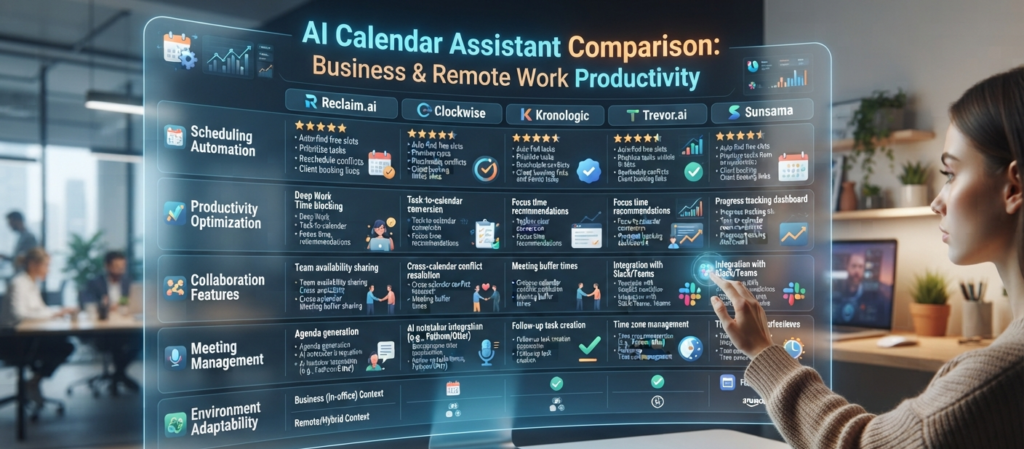
The best AI calendar assistant depends on how you work, the productivity tools you already use, and the level of automation you need.
Choose Motion if…
- You want a fully automated daily schedule.
- You manage multiple projects simultaneously.
- You want AI to automatically reorganize tasks around meetings.
- Productivity optimization is your highest priority.
Choose Reclaim AI if…
- You use Google Calendar every day.
- You want to protect focus time automatically.
- You balance meetings, habits, and recurring tasks.
- You work remotely or in a hybrid environment.
Choose Clockwise if…
- You work in a collaborative team.
- Your calendar is filled with meetings.
- You want longer uninterrupted focus sessions.
- Your company relies heavily on Google Workspace.
Choose Google Gemini if…
- You already use Google Workspace.
- You rely on Gmail, Google Calendar, and Google Meet.
- You prefer conversational AI assistance.
- You want AI integrated into Google’s ecosystem.
Choose Microsoft Copilot if…
- Your organization uses Microsoft 365.
- Outlook and Teams are part of your daily workflow.
- You want enterprise-grade AI scheduling.
- You need seamless integration with Microsoft’s productivity tools.
Choose Notion Calendar if…
- You already organize projects in Notion.
- You manage documentation and scheduling together.
- You want one connected productivity workspace.
Choose Trevor AI if…
- You love time blocking.
- You want AI to turn your task list into a realistic daily schedule.
- You work independently or as a freelancer.
Choose Sunsama if…
- You prefer mindful productivity.
- You want realistic daily planning.
- You value work-life balance over maximizing meeting volume.
Choose Akiflow if…
- You use multiple productivity applications.
- You want one unified workspace.
- Workflow automation is important to you.
- You manage many projects simultaneously.
Choose Calendly AI if…
- You schedule meetings with clients every day.
- You work in sales or consulting.
- You want to eliminate scheduling emails.
- You frequently organize appointments across different time zones.
Frequently Asked Questions
What is an AI calendar assistant?
An AI calendar assistant uses artificial intelligence to organize meetings, optimize schedules, prioritize tasks, identify scheduling conflicts, and automatically adjust calendars based on changing priorities.
Are AI calendar assistants better than traditional calendar apps?
Traditional calendars mainly store appointments.
AI calendar assistants actively optimize your schedule, recommend meeting times, protect focus hours, and continuously reorganize tasks to improve productivity.
Which AI calendar assistant is best for Google Calendar?
Reclaim AI, Clockwise, Motion, and Google Gemini all offer excellent integration with Google Calendar and provide intelligent scheduling capabilities.
Which AI calendar assistant is best for Microsoft 365?
Microsoft Copilot is the strongest option for organizations using Outlook, Microsoft Teams, and Microsoft 365 because it integrates directly into Microsoft’s productivity ecosystem.
Can AI automatically schedule meetings?
Yes.
Most modern AI calendar assistants can automatically find available meeting times, coordinate multiple calendars, resolve scheduling conflicts, and send invitations without manual intervention.
Are AI calendar assistants secure?
Leading providers implement encryption, secure authentication, and enterprise security standards. Before connecting work calendars, organizations should review each provider’s security documentation and privacy policies.
Final Thoughts
AI calendar assistants have evolved from simple scheduling tools into intelligent productivity partners.
Instead of manually coordinating meetings, rearranging calendars, and protecting focus time, professionals can rely on AI to automate repetitive scheduling tasks while maintaining flexibility throughout the workday.
Whether you’re managing a startup, coordinating a remote team, running a business, or simply trying to stay organized, the right AI calendar assistant can save hours every week and help you focus on meaningful work.
As AI continues to improve throughout 2026, scheduling assistants will become even more personalized, proactive, and deeply integrated into the productivity platforms people already use every day.
Official Sources
Motion
https://www.usemotion.com/
Reclaim AI
https://reclaim.ai/
Clockwise
https://www.getclockwise.com/
Google Gemini
https://gemini.google.com/
Microsoft Copilot
https://www.microsoft.com/copilot
Notion Calendar
https://www.notion.com/product/calendar
Trevor AI
https://trevorai.com/
Sunsama
https://www.sunsama.com/
Akiflow
https://akiflow.com/
Calendly
https://calendly.com/
Internal Link Opportunities
Best AI Productivity Tools in 2026
Best AI Meeting Assistants in 2026
Best AI Email Assistants in 2026
Best AI Note Taking Apps in 2026
Best AI PDF Summarizers in 2026
Best AI Research Tools in 2026
What Is AI Workflow Automation? (2026)


