



Quick Answer
Claude Code is Anthropic‘s AI-powered coding assistant designed to help developers write, understand, debug, and improve software directly from their development environment. Unlike traditional autocomplete tools, Claude Code can reason through complex codebases, explain architecture, generate tests, refactor applications, and assist throughout the entire software development lifecycle.
For most developers in 2026, Claude Code has become one of the most capable AI programming assistants available.
Key Takeaways
- Claude Code is not a separate AI model.
- It uses Claude models such as Sonnet or Opus to assist with programming tasks.
- It helps developers write, debug, refactor, and understand code.
- It supports professional software engineering workflows rather than simple code completion.
- It competes with GitHub Copilot, Cursor AI, and other AI coding assistants.
Table of Contents
- What Is Claude Code?
- Why Did Anthropic Build Claude Code?
- How Claude Code Works
- Key Features
- Real-World Use Cases
- Claude Code vs GitHub Copilot
- Claude Code vs ChatGPT
- Pros and Cons
- Frequently Asked Questions
- Final Thoughts
What Is Claude Code?
Claude Code is Anthropic’s developer-focused coding experience that brings Claude’s reasoning capabilities directly into software development.
One of the biggest misconceptions online is that Claude Code is another Claude model.
It isn’t.
Claude Code is an interface and workflow built around Claude AI models. Instead of creating a new language model, Anthropic designed an environment where developers can interact with Claude while building, maintaining, and improving software projects.
This distinction is important because the intelligence comes from Claude models such as Sonnet and Opus, while Claude Code provides the tools and workflow that make those models useful for programming.
Why Did Anthropic Build Claude Code?
Modern software development involves much more than writing code.
Developers spend a significant amount of time:
- Understanding unfamiliar codebases
- Reviewing pull requests
- Fixing bugs
- Writing documentation
- Refactoring legacy applications
- Creating automated tests
- Explaining architecture to teammates
Traditional AI code completion tools are excellent at predicting the next line of code, but they often struggle to understand the broader context of an application.
Claude Code was designed to bridge that gap.
Rather than acting as a simple autocomplete engine, it aims to function as an intelligent programming partner capable of reasoning through large projects and helping developers make better engineering decisions.
How Claude Code Works
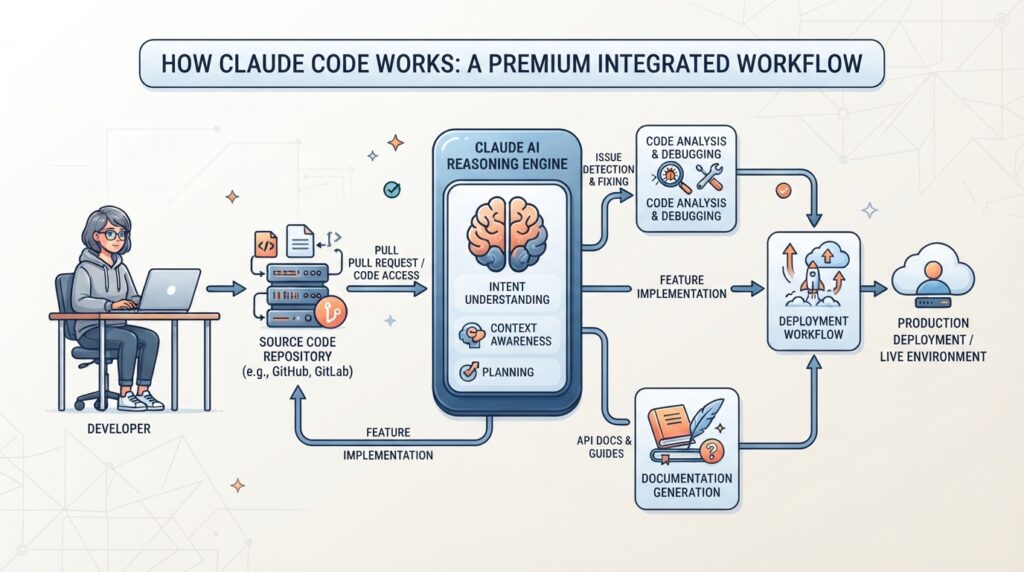
Claude Code combines the reasoning capabilities of Claude models with tools designed specifically for developers.
Instead of only suggesting code snippets, it can analyze entire repositories, understand relationships between files, explain existing logic, and propose improvements based on the overall architecture of a project.
A typical workflow looks like this:
- A developer opens an existing project.
- Claude analyzes the project structure.
- The developer asks questions or requests changes.
- Claude generates explanations or code.
- The developer reviews and applies the suggestions.
This collaborative workflow allows developers to stay focused while reducing repetitive tasks.
Key Features
Intelligent Code Generation
Claude Code can generate complete functions, classes, APIs, and scripts based on natural language instructions.
Instead of only producing short snippets, it understands broader programming objectives and generates code that aligns with the surrounding project.
Code Refactoring
Maintaining software is often more challenging than writing it.
Claude Code helps developers improve readability, simplify complex logic, remove duplicated code, and modernize older projects without changing intended functionality.
Bug Detection
Developers can describe an error, share stack traces, or point to unexpected behavior.
Claude Code analyzes the surrounding code and suggests likely causes along with possible fixes.
Unlike traditional debugging tools, it also explains why a problem occurs, making it valuable for learning as well as troubleshooting.
Documentation
Well-written documentation saves teams countless hours.
Claude Code can generate:
- API documentation
- Function descriptions
- README files
- Technical guides
- Inline comments
This helps teams maintain consistency across projects.
Test Generation
Writing tests is essential but often time-consuming.
Claude Code can create:
- Unit tests
- Integration tests
- Edge case scenarios
- Validation examples
This encourages better software quality while reducing repetitive work.
Real-World Use Cases
Claude Code is designed for much more than generating code snippets. Its strength lies in helping developers solve real software engineering problems across the entire development lifecycle.
Here are some practical examples of how developers use Claude Code.
Building a New Feature
Imagine you’re adding a user authentication system to an existing web application.
Instead of writing every file manually, you can describe the feature in plain English.
Claude Code can suggest project structure, generate authentication logic, explain security considerations, and even recommend best practices for organizing the implementation.
Rather than replacing the developer, it accelerates the development process while keeping the human in control.
Understanding Legacy Code
Many developers spend hours trying to understand projects written by someone else.
Claude Code can analyze unfamiliar codebases and explain:
- How components interact
- What each module does
- Why specific functions exist
- Where potential issues might appear
This makes onboarding new developers significantly faster.
Debugging Complex Issues
Finding bugs is often harder than writing new code.
Developers can paste an error message, describe unexpected behavior, or share a problematic function.
Claude Code analyzes the surrounding logic, identifies possible root causes, and explains why the issue occurs instead of simply suggesting a quick fix.
This educational approach helps developers improve their debugging skills over time.
Refactoring Existing Applications
As projects grow, code often becomes difficult to maintain.
Claude Code can recommend cleaner architectures, simplify duplicated logic, improve naming conventions, and modernize outdated patterns while preserving functionality.
This makes long-term maintenance much easier.
Learning New Technologies
Developers frequently use Claude Code as an interactive programming mentor.
Whether learning React, Python, Rust, Go, TypeScript, or Kubernetes, Claude Code explains concepts, generates examples, and answers technical questions in context.
For beginners, this creates a much more interactive learning experience than reading documentation alone.
Claude Code vs GitHub Copilot
Although both tools assist developers, they are designed with different philosophies.
GitHub Copilot focuses primarily on code completion and inline suggestions.
Claude Code focuses on reasoning, understanding, and collaboration.
| Feature | Claude Code | GitHub Copilot |
|---|---|---|
| Code Completion | ⭐⭐⭐⭐ | ⭐⭐⭐⭐⭐ |
| Repository Understanding | ⭐⭐⭐⭐⭐ | ⭐⭐⭐ |
| Code Explanation | ⭐⭐⭐⭐⭐ | ⭐⭐⭐⭐ |
| Debugging | ⭐⭐⭐⭐⭐ | ⭐⭐⭐⭐ |
| Architecture Discussions | ⭐⭐⭐⭐⭐ | ⭐⭐⭐ |
| Documentation | ⭐⭐⭐⭐⭐ | ⭐⭐⭐⭐ |
| Learning Support | ⭐⭐⭐⭐⭐ | ⭐⭐⭐⭐ |
In practice, many professional developers use both tools together rather than choosing only one.
Copilot excels at speeding up repetitive coding, while Claude Code shines when developers need deeper understanding or architectural guidance.
Claude Code vs ChatGPT

Many developers wonder whether Claude Code simply replaces ChatGPT.
The answer is no.
ChatGPT is a general-purpose AI assistant capable of discussing programming alongside countless other topics.
Claude Code is specifically designed around developer workflows.
| Feature | Claude Code | ChatGPT |
|---|---|---|
| Software Development Focus | ⭐⭐⭐⭐⭐ | ⭐⭐⭐⭐ |
| Repository Analysis | ⭐⭐⭐⭐⭐ | ⭐⭐⭐ |
| General Knowledge | ⭐⭐⭐⭐ | ⭐⭐⭐⭐⭐ |
| Writing & Brainstorming | ⭐⭐⭐⭐ | ⭐⭐⭐⭐⭐ |
| Coding Assistance | ⭐⭐⭐⭐⭐ | ⭐⭐⭐⭐⭐ |
| Project Context | ⭐⭐⭐⭐⭐ | ⭐⭐⭐ |
Developers working inside active software projects often benefit from Claude Code’s specialized workflow, while ChatGPT remains valuable for brainstorming, learning new concepts, and solving broader technical problems.
Who Should Use Claude Code?

Claude Code is suitable for a wide range of developers.
Students
Students learning programming can use Claude Code to understand concepts, explain errors, and receive guided assistance instead of simply copying code.
Freelancers
Freelance developers can speed up client projects, improve documentation, and reduce time spent debugging.
Startup Teams
Startups often need to build products quickly with small engineering teams.
Claude Code helps automate repetitive development tasks while allowing engineers to focus on product innovation.
Enterprise Engineering Teams
Large organizations benefit from Claude Code’s ability to understand complex repositories, improve documentation, and assist with large-scale software maintenance.
Pros and Cons
Advantages
- Excellent reasoning capabilities
- Understands large codebases
- Strong debugging support
- Generates documentation automatically
- Improves developer productivity
- Supports modern programming workflows
- Useful for beginners and experienced engineers alike
Limitations
- AI-generated code still requires human review.
- Performance depends on the complexity of the project.
- Developers must verify security-sensitive implementations.
- It should complement software engineering expertise rather than replace it.
Expert Analysis
Claude Code represents a shift in how AI supports software development.
Earlier AI coding tools focused mainly on predicting the next line of code.
Claude Code moves beyond autocomplete by helping developers understand systems, make architectural decisions, and collaborate with AI throughout the development process.
This reflects a broader trend in software engineering, where AI is becoming an active teammate rather than just a code generator.
Claude Code Pricing
Anthropic offers Claude Code as part of its developer ecosystem rather than as a standalone AI model. Access and pricing depend on the Claude plan or API usage associated with your account.
For individual developers, Claude Code can be accessed through supported Claude plans and development workflows.
For teams and enterprises, API-based pricing scales according to the Claude model being used, making it possible to balance performance and cost depending on project requirements.
As Anthropic continues to evolve its platform, developers should always refer to the official pricing page for the latest plans and token-based pricing.
Is Claude Code Worth Using?

For many developers, the answer is yes.
Claude Code is particularly valuable if your work involves:
- Large codebases
- Software architecture
- Refactoring legacy applications
- Debugging complex issues
- Writing documentation
- Learning unfamiliar technologies
Rather than replacing developers, Claude Code helps reduce repetitive work while improving productivity and code quality.
Frequently Asked Questions
Is Claude Code free?
Claude Code availability depends on the Claude plan and supported developer workflows. Some features may require a paid subscription or API usage.
Is Claude Code a separate AI model?
No.
Claude Code is a coding environment powered by Claude models such as Sonnet and Opus.
Which Claude model powers Claude Code?
Claude Code typically works with Claude models including Sonnet and Opus, depending on the selected configuration and available features.
Can Claude Code replace GitHub Copilot?
Not necessarily.
Many developers use both tools together. GitHub Copilot excels at inline code completion, while Claude Code focuses on reasoning, project understanding, debugging, and software architecture.
Is Claude Code good for beginners?
Yes.
It can explain programming concepts, review code, identify mistakes, and provide detailed explanations, making it a useful learning companion for new developers.
Which programming languages does Claude Code support?
Claude Code can assist with a wide range of languages, including:
- Python
- JavaScript
- TypeScript
- Java
- C#
- Go
- Rust
- PHP
- Ruby
- Swift
- Kotlin
- SQL
Support is continually improving as Claude models evolve.
Can Claude Code generate documentation?
Yes.
It can produce README files, API documentation, inline comments, architecture summaries, and technical explanations.
Can Claude Code review existing projects?
Yes.
One of its strengths is understanding existing repositories and helping developers navigate unfamiliar codebases.
Is Claude Code suitable for enterprise teams?
Absolutely.
Its ability to analyze large projects, explain architecture, and improve developer workflows makes it valuable for enterprise software development.
Will Claude Code replace software developers?
No.
Claude Code is designed to assist developers rather than replace them. Human review, architectural decisions, security validation, and business logic remain essential parts of professional software engineering.
Final Verdict

Claude Code represents a new generation of AI-assisted software development.
Instead of acting as a simple autocomplete tool, it functions as an intelligent engineering assistant capable of understanding projects, explaining architecture, generating documentation, and supporting developers throughout the software development lifecycle.
For beginners, it serves as an interactive programming mentor.
For experienced engineers, it becomes a productivity tool that helps eliminate repetitive work while improving code quality.
As AI continues transforming software engineering, Claude Code is likely to play an increasingly important role in how developers build, maintain, and understand modern applications.
Related Articles
Continue learning with these guides:
- Claude AI Models Explained (2026)
- Anthropic Unveils Claude Sonnet 5
- Claude Science Explained
- Claude Model Comparison (2026)
- Claude vs ChatGPT (Coming Soon)
- Best AI Coding Tools (Coming Soon)
Sources
This guide is based on official Anthropic documentation and developer resources, along with publicly available technical information about Claude’s coding capabilities.
For the latest updates, always consult Anthropic’s official documentation and release notes.


